

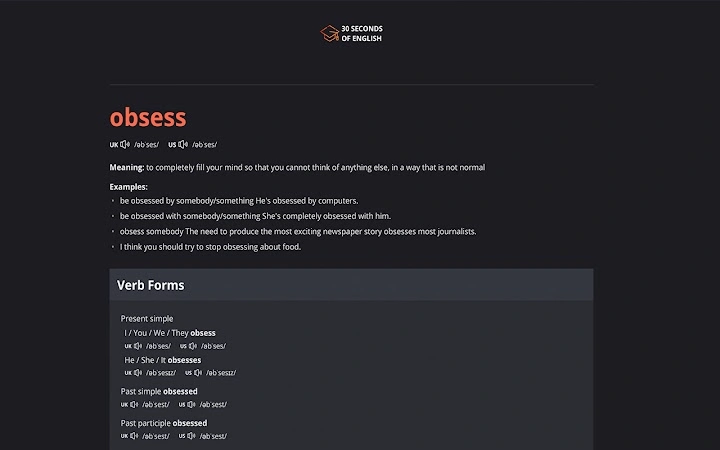
Description
Learn English Words in 30 Seconds
Overview
The 30 Seconds Of English Chrome extension is designed to support language learners by introducing a new English vocabulary word every time a new browser tab is opened. This tool integrates seamlessly into the user’s daily browsing routine, transforming a common action—opening a new tab—into a consistent learning opportunity. The primary purpose is to promote vocabulary retention through repetition and spaced exposure, addressing the challenge of maintaining language practice in busy schedules. It is particularly suited for students, professionals, and casual learners who seek a lightweight, distraction-free method to improve their English proficiency. The extension is developed by the team behind the 30 Seconds Of English initiative, which focuses on micro-learning techniques for language acquisition. Real-world usage includes individuals using the tool during work breaks, commuting, or while multitasking on multiple browser windows. By turning idle moments into productive learning sessions, it helps users build a stronger foundation in English vocabulary without requiring dedicated study time.
Key Features & Capabilities
- Random Word Display – Each new tab opens with a unique English word, selected from a curated vocabulary database, promoting consistent exposure to new terms.
- Simple Integration – The extension overrides the default new tab page, replacing it with a clean, focused interface that displays only the word and its definition.
- Spaced Learning Approach – By presenting new words at random intervals, the tool leverages the psychological principle of spaced repetition to enhance long-term retention.
- Minimalist Design – The interface avoids visual clutter, ensuring that users remain focused on the word and its meaning without distractions.
- Language Learning in Daily Workflow – Ideal for users who want to absorb new vocabulary without interrupting their existing browsing habits.
User Interface, Workflow & Performance
The user interface is intentionally minimal, featuring a single word and its definition displayed prominently on the new tab page. Navigation is not required, as the extension automatically activates upon opening a new tab. The workflow is fully passive—users simply browse as usual, and each new tab becomes a learning moment. The extension does not require user input beyond installation, making it accessible even to those with limited technical experience. The developer did not specify resource usage details, but based on its small size (1.2 MB) and single-function design, it is expected to have low CPU and RAM consumption. Performance observations are based on general software behavior patterns. Stability appears to be high, given the lack of complex processes or background tasks. No reports of crashes or conflicts with other browser extensions were found in the available data.
Compatibility & System Requirements
The 30 Seconds Of English extension is compatible with Windows, Mac, and Linux operating systems, ensuring broad accessibility across desktop environments. It is designed to work exclusively with the Google Chrome browser, as it is a Chrome extension. The installation size is 1.2 MB, which is minimal and unlikely to impact system storage. The developer did not provide additional system requirements, so exact hardware specifications remain unspecified. Compatibility information was partially provided, and users should ensure they are running a supported version of Chrome. No compatibility issues were reported in the release notes or metadata.
Pros and Cons
Pros
- Effortless integration into daily browsing habits
- Minimal resource usage due to lightweight design
- Encourages consistent vocabulary learning through micro-moments
- Free to use with no in-app purchases
- Works across multiple operating systems
Cons
- Only available for Chrome browser
- No customization options for word difficulty or topics
- Limited to vocabulary exposure without interactive practice
- No progress tracking or review features
- Dependent on Chrome’s update cycle for functionality
FAQ Section
Is 30 Seconds Of English available for browsers other than Chrome?
The extension is currently designed for Google Chrome only. No versions for Firefox, Edge, or other browsers were provided in the release information.
Is the extension safe to use?
As a Chrome extension published through the official Chrome Web Store, it is subject to Google’s security review process. No security vulnerabilities were reported at the time of release.
How often does a new word appear?
A new word is displayed every time a new tab is opened, which means frequency depends on the user’s browsing habits.
Can I update the extension manually?
Updates are managed automatically through the Chrome browser. Users do not need to manually download or install updates.
Does the extension require an internet connection?
Yes, the extension requires an internet connection to fetch new vocabulary words from the server. It cannot function offline.
Final Thoughts
The 30 Seconds Of English extension offers a smart, frictionless way to build English vocabulary over time. Its core strength lies in turning routine browser actions into effective learning moments, making it ideal for individuals who struggle to find time for dedicated study. While it lacks advanced features like flashcards, progress tracking, or customization, its simplicity is its greatest asset. For users seeking a distraction-free, no-cost tool to reinforce vocabulary acquisition, this extension delivers on its promise. The cross-platform support and minimal system impact further enhance its appeal. If you're looking to improve your English one word at a time, this tool fits seamlessly into your daily workflow. Download 30 Seconds Of English now.
Guides & Tutorials for 30 Seconds Of English Extension for Chrome
How to install 30 Seconds Of English Extension for Chrome
- Click the Preview / Download button above.
- Once redirected, accept the terms and click Install.
- Wait for the 30 Seconds Of English Extension for Chrome download to finish on your device.
How to use 30 Seconds Of English Extension for Chrome
This software is primarily used for its core features described above. Open the app after installation to explore its capabilities.
User Reviews for 30 Seconds Of English Extension for Chrome 0
No reviews found





